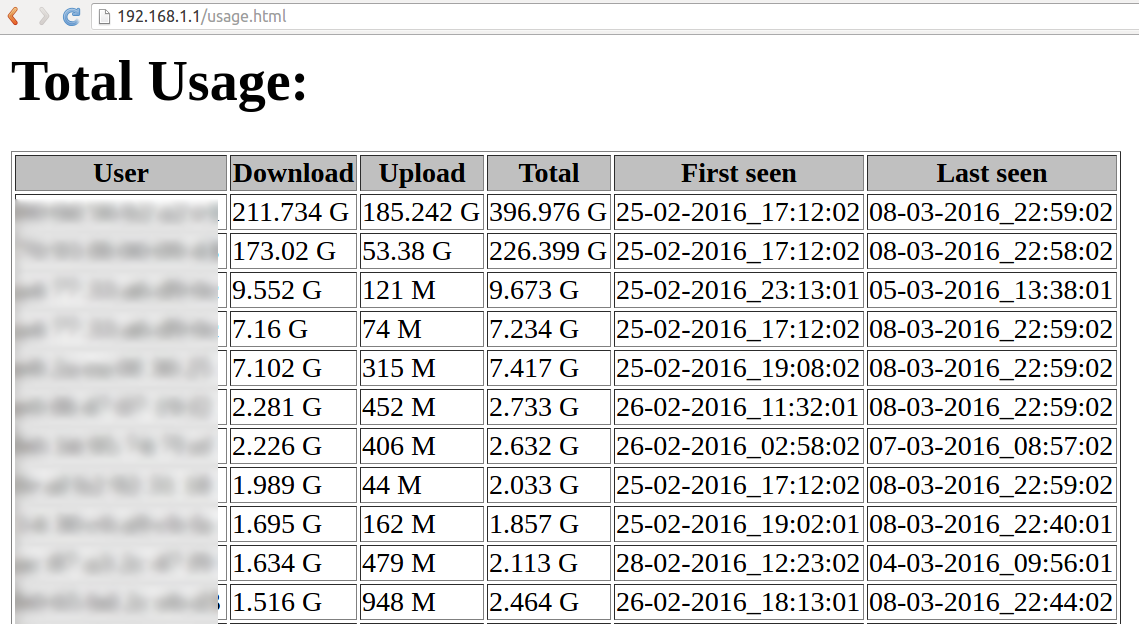
wrtbwmon is a small and basic shell script designed to run on linux powered routers (OpenWRT, DD-WRT, Tomato, and other routers where shell access is available). It provides per user bandwidth monitoring capabilities and generates usage reports. See the screenshot here.
Original wrtbwmon is hosted on code.google, but it has been dead since 2010. We have a fork for OpenWrt which is hosted on github by pyrovski.
There are many good general descriptions about how to install it:
Based on these 3 descriptions I've created a step-by-step manual for installing wrtbwmon on OpenWrt:
Note: If you're looking for an install that will collect data for you in a sqlite3 database
Using wrtbwmon consists of three separated steps: setup, update and publish.
Note: The setup below uses pyrovski's version of wrtbwmon. Other versions may differ.
if [ -x /opt/wrtbwmon/wrtbwmon ]; then
	logger -t 'rc.local' "Starting wrtbwmon setup..."
	/opt/wrtbwmon/wrtbwmon setup  /tmp/usage.db
fi
cat << "EOF" >> /etc/crontabs/root
*/5 * * * * /opt/wrtbwmon/wrtbwmon update /tmp/usage.db
EOF
service cron restart
logread -l 5 -f
#!/bin/sh
echo 'Content-Type: text/html'
echo 'X-Dummy: dummy'
echo
/opt/wrtbwmon/wrtbwmon update  /tmp/usage.db
/opt/wrtbwmon/wrtbwmon publish /tmp/usage.db /tmp/usage.htm /opt/wrtbwmon/macusers.txt
cat /tmp/usage.htm
You can change loglevel of cron in order to write only error messages into syslog by:
uci set system.@system[0].cronloglevel="9"
uci commit system
service cron restart
logread -l 5 -f
If you are interested in the traffic of the current day, then usage.db file has to be deleted every day at midnight. If we move usage.db file instead of deleting, then it can be used later for publishing via cgi-bin.
0 0 * * * mv /tmp/usage.db /mnt/usbdrive/wrtbwmon/usage-$(date '+%Y.%m.%d').db
Note: this only works with kallisti's version. Bandwidth usage can be separated to peak and offpeak times.
In this example the off-peak counters get updated from 4:00 to 8:59, the peak counters the rest of the day.
*/30 0-3    * * * /opt/wrtbwmon/wrtbwmon update  /tmp/wrtbwmon.db peak
*/30,59 4-8 * * * /opt/wrtbwmon/wrtbwmon update  /tmp/wrtbwmon.db offpeak
*/30 9-23   * * * /opt/wrtbwmon/wrtbwmon update  /tmp/wrtbwmon.db peak
The /tmp/usage.db file is a database file that contains the accounting records. It will be written to very often, so it is not recommended to put it on flash memory, but should be put in RAM (like in /tmp/ directory). If you put it in RAM, schedule a periodic backup task and restore it if missing, for example:
# local backup storage
15 * * * * cp /tmp/usage.db /mnt/usbdrive/wrtbwmon/
 * * * * * [ ! -f /tmp/usage.db ] && cp /mnt/usbdrive/wrtbwmon/usage.db /tmp/
# online backup storage
15 * * * * cd /tmp && ftpput -u username -p password usage.db . some_ftp_server_url
 * * * * * [ ! -f /tmp/usage.db ] && wget some_url/usage.db -O /tmp/usage.db
You may use a forked version and is luci companion.